2015-01-27 - 16800 - Spec - Create plant specific inforecords #SNCProject #sncsup #inforeq
SPECIFICATIONS
2015-01-27 - Spec - 16800 - Create plant specific Inforecords
Purpose
Create Plant Specific Inforercords.
Admin Info
| Purpose |
Create Plant Specific Info Records |
| Requested By |
Saravanan |
| Spec Created By |
Adithya |
| Spec Created Date |
01/27/2015 |
| Spec QA by |
Adithya |
| Objects |
SPRO -> IMG |
| Document Status |
Complete |
Estimates
| Sl.No |
Activity |
Estimation in Hours |
| 1 |
Research |
08 |
| 2 |
Documentation |
08 |
| 3 |
Development/ Config |
02 |
| 4 |
Unit test in DEV |
02 |
| 5 |
Unit test in QUA |
02 |
| 6 |
Other activity |
|
| TOTAL |
22 |
References
Prior Tickets
[Provide links of prior associated Spec / Break Fix BOSS document(s)]Documents
[Attach any document(s) received for the requirement(s)]Spec Changes
[List the changes made to program after the approval of the original requirement along with the Date on which the change request was received and the name of the initiator]
| Sl. |
Change Details |
Requested By |
Requested On |
Notes if any |
Functional Requirement
Purpose/WHY:
[Explain the purpose of the project and the reason why this requirement has come]Info records must to be created at plant specific automatically when the PO is created for the first time for that Material.
Currently Info Records are created at P Org Level automatically when a PO is create.
SNC Doesn't accept the P Org level Info Records hence the Info Records wont get transfer to SNC System through CFM1 which impacts the purchase order transfer failure to SNC.
In Scope:
[List the activities to be included in scope]Plant Level Info Records.
The Data by which the PO is created are updated in the Info Records, like Shipping Instructions, Confirmation Key etc
Out of Scope:
[Out of scope activities]Solution Summary
[Discuss this section with Requester and get approval prior to beginning work]
For the Purchase Info Records to be created automatically when purchase orders are created at plant level, Conditions at plant level must be activated.
This is a configuration which needs to be done in the IMG Path:
IMG --> Materials Management --> Purchasing --> Conditions --> Define Condition Control at plant level.
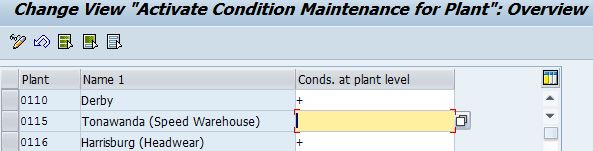
We can activate the Conditions at plant level by assigning "+" to the Corresponding Plant.
Test Plan
[List test scenarios/cases to be executed here]| Test ID |
Test Scenario |
Expected Results |
| SCM001 |
Create a PO with New Material (10017775) for plant 0110 activating conditions at plant level "+" |
A Info Record for material at plant (0110) level must be created |
| SCM002 |
Create a PO with the same Material for plant 0310 activating conditions at plant level "+" |
Same Info Record must be extended at plant level 0310 with the data given in the PO |
| SCM003 |
Create a PO with the Same Material for same plant 0310 but with different Vendor activating conditions at plant level "+" |
A New Info Record must be created for the New Vendor with the data given in the Purchase Order at plant specific. |
Solution Details
[Provide complete technical details for configuration or programming here]
Configure the conditions at the plant level for all those plants for which Info Records needs to be generated at plant specific.
Issues
[List Issues / Bugs identified in configuration or development]